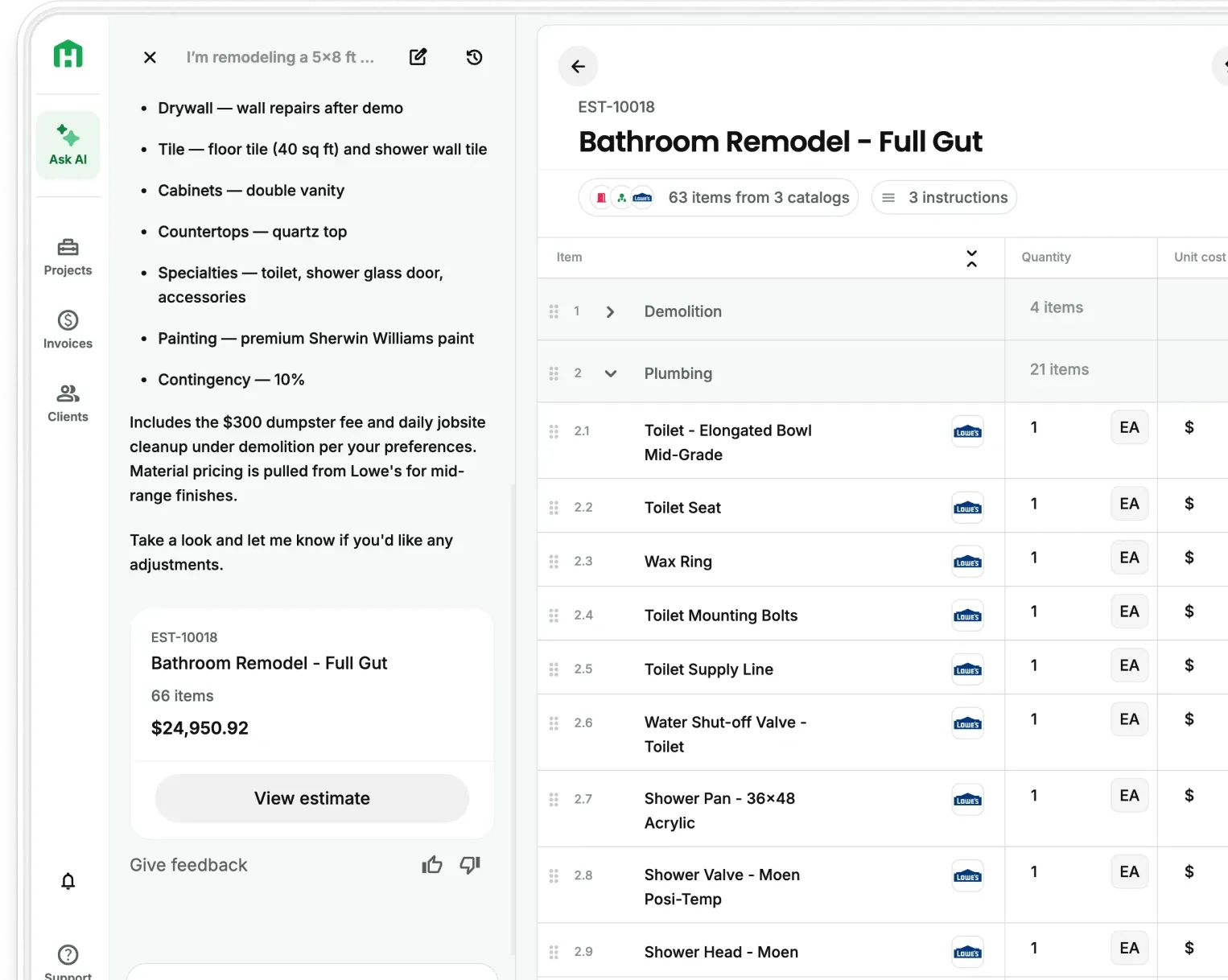
The right estimating software saves a residential remodeler 5–10 hours a week. The wrong one costs you that time twice. Before buying, five questions separate the tools worth your money from the ones that look good in a demo and frustrate you by week two.
What bad estimating software actually costs you
Most contractors who switch estimating platforms do it because the tool they bought stopped working for them and they lost time, margin, and sometimes clients in the process.
The costs that show up most often:
- Inaccurate material pricing. A tool that pulls national averages instead of regional pricing produces estimates that miss by 15–25% in either direction. Underbid and you eat the difference. Overbid and you lose the job to a competitor working from current local numbers.
- A learning curve that never flattens. Software built for commercial GCs or enterprise firms gets layered with features a two-person remodeling team will never use. Every estimate takes longer because the workflow wasn't designed for how you work.
- No mobile access. If you can't pull up an estimate or update a scope on your phone at a walkthrough, the tool isn't built for your day. It's built for a desk.
- Poor proposal output. A line-item spreadsheet emailed as a PDF is not a proposal. Tools that can't produce a formatted, professional-looking document with your branding cost you jobs to contractors who can.
Most independent contractors work 45–55 hours a week but only 25–35 of those hours are billable — estimating, admin, and travel eat the rest. The contractors who close that gap fastest are the ones who stop rebuilding the same estimate from scratch every time a new lead comes in.
What to look for in construction estimating software
Consider these questions worth answering before you commit to any platform:
Is it built for residential remodeling specifically?
General contractor platforms and commercial tools include features you'll never use and miss features you need constantly — room-by-room pricing, finish selections, residential scope templates. A tool built for your project type produces better output faster. Ask whether it has templates for kitchens, bathrooms, additions, and full-home remodels out of the box.
How does it handle material pricing?
This is the most important technical question. Does the software pull from a regional, location-specific cost database — or does it use national averages you have to manually correct? The best tools update pricing in real time from actual suppliers in your market. AI-powered estimating has proven to increase pricing accuracy by removing the guesswork that comes from memory and outdated spreadsheets.
How quickly can you generate a usable estimate?
A tool that takes two hours to produce what a spreadsheet could do in 90 minutes isn't saving you time — it's adding process overhead. Look for the time from "site visit complete" to "proposal sent." The best platforms get that window to 15–20 minutes for a standard scope.
Does it work on your phone?
You're not always at a desk. A site walkthrough where you can capture notes, photos, and generate a first draft before leaving the driveway is worth more than any feature you'll use once a quarter. Mobile-first isn't a nice-to-have for a contractor running two or three jobs simultaneously.
Does the estimate become the proposal automatically?
Retyping information from your estimating tool into a separate proposal document is a workflow failure. The estimate and the proposal should be the same document — line items, timeline, scope narrative, and your branding — generated once and sent directly to the client.
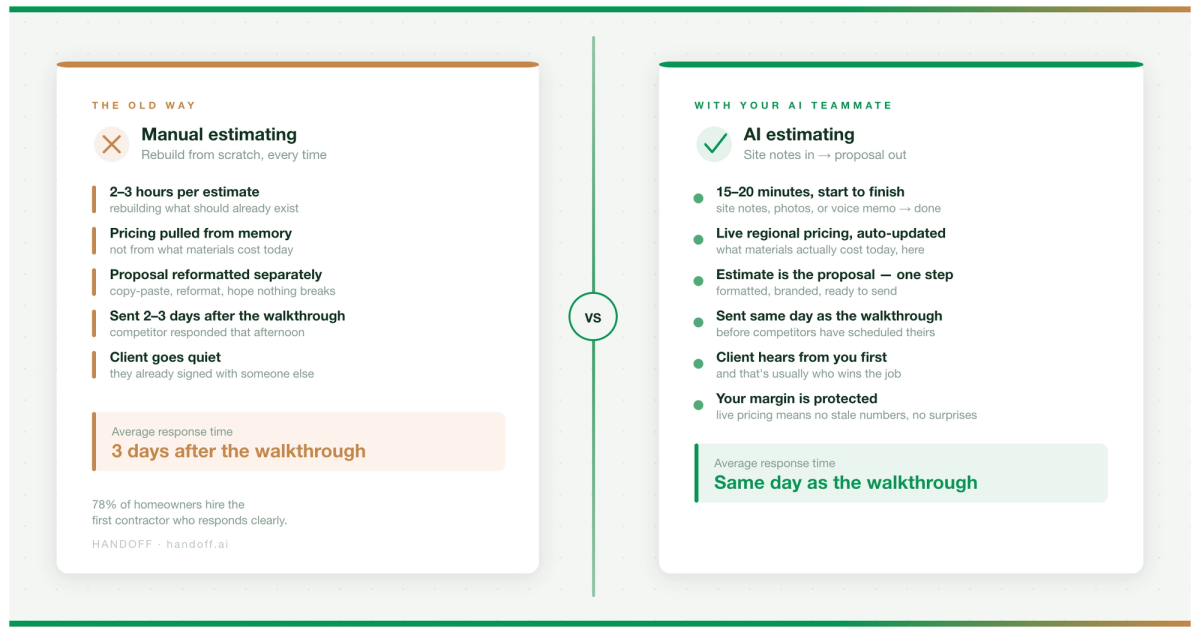
AI estimating software vs. traditional tools for remodelers
The practical difference between AI-powered estimating and traditional software isn't the technology. It's the time.
The comparison that matters for a residential remodeler:
- Traditional software: accurate when maintained, slow to update, proposal requires a separate step, limited mobile functionality. Traditional tools are accurate if you keep them current. Most contractors don't have time to keep them current
- AI estimating: pricing updated from regional suppliers automatically, calculate quantities from scope inputs, and generate formatted proposals without a separate step
Your AI Teammate handles the calculation and formatting — your job is to review the numbers and send.
The contractors who've moved to AI estimating consistently report the same outcome: bids go out the same day instead of the next morning, close rates improve because clients receive a response before competitors have scheduled their walkthrough, and the dread of estimate night disappears when the tool does the heavy lifting.
How to evaluate estimating software before you pay for it
Most platforms offer a free trial. Most contractors don't use it properly. A demo that shows you the best-case scenario is it's a sales presentation.
A real evaluation takes one job from start to finish
- Enter a scope you've actually bid before — one you know the right numbers for
- Use only the tool, not your own memory or external pricing
- Time yourself from scope input to proposal sent
- Compare the output to what you'd have produced manually
If the numbers are in range and the proposal looks better than what you send today, the tool is worth the subscription. If you had to fight the software to get there, it isn't.
Three things worth asking a sales rep directly before signing up
- What does implementation actually take — hours, days, or weeks?
- Is customer support available by phone or chat, or only through a ticketing system?
- What happens to your data if you cancel?
The ROI math is straightforward: if the software saves you three hours a week and your time is worth $75 an hour, that's $225 a week, or roughly $11,700 a year. Most estimating platforms cost $150–$400 a month. Handoff's pricing is designed to pay for itself within the first few estimates.
Other FAQs about choosing the right AI estimator
Is AI estimating software accurate enough to use on real jobs?
Yes, with the right inputs. AI estimating tools are accurate when the scope is clearly defined and the platform pulls from current regional pricing. Contractors still review and adjust line items — the AI handles the starting point and the math, not the judgment calls. Most residential remodelers report AI-generated estimates land within 5–10% of their manual numbers on familiar scopes.
What's the difference between estimating software and proposal software?
In practice, the best tools don't distinguish between them. Estimating software that forces you to reformat and reenter data into a separate proposal document adds a step that costs time and introduces errors. Look for a platform where the estimate is the proposal — line items, scope narrative, timeline, and branding generated together from the same inputs.
How long does it take to get up to speed on new estimating software?
For a purpose-built residential remodeling platform, most contractors are generating usable estimates within their first session — typically two to three hours. Enterprise or commercial tools built for larger organizations can take weeks. The right signal is whether you can complete a real estimate on your first day without calling support.
Ready to win more jobs with less manual work? Try Handoff free →