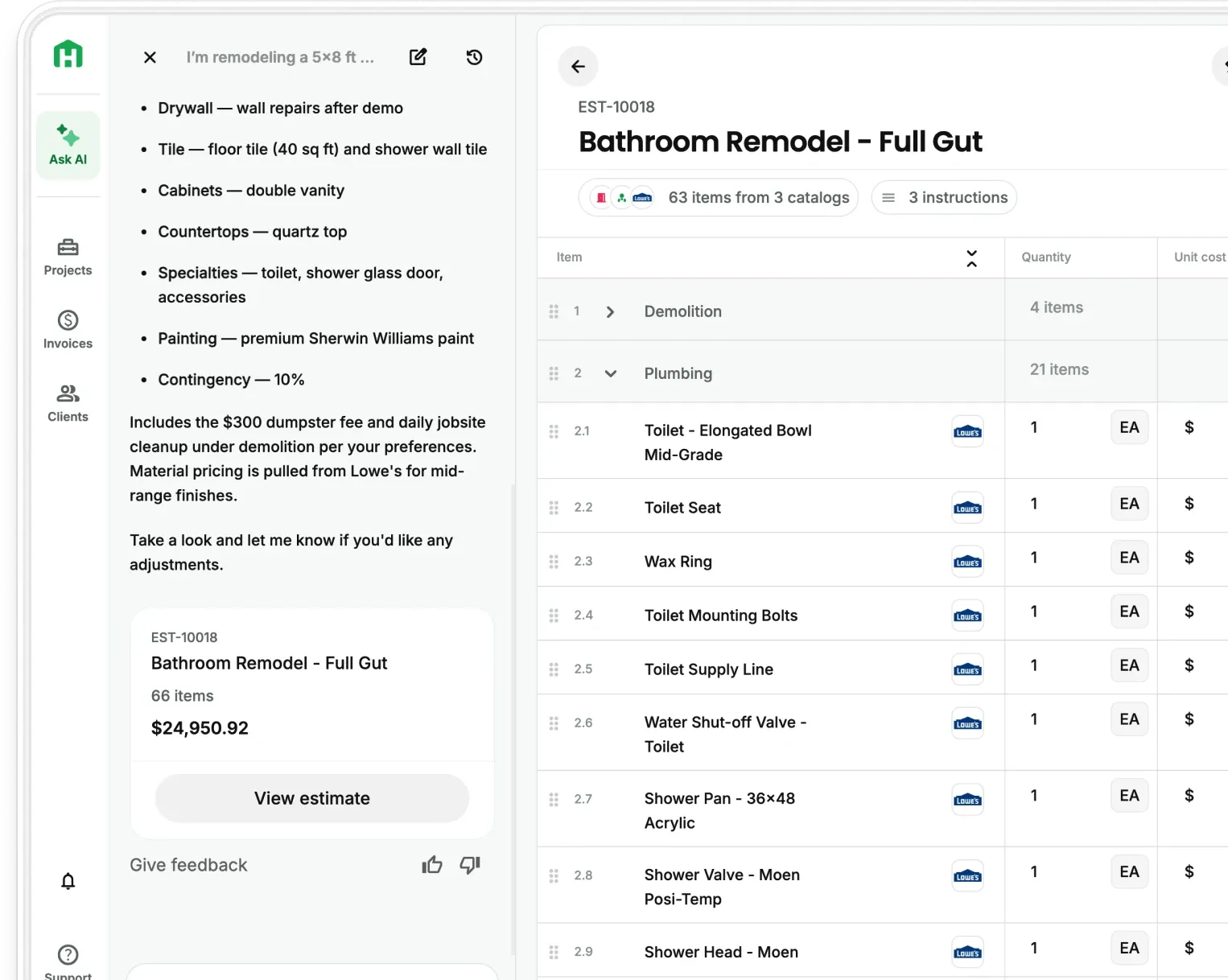
If you're still building estimates in a spreadsheet at 10pm, manually counting fixtures and guessing at material costs, you already know it's costing you. Not just time — actual money. Bids that take three days to turn around lose to contractors who send something the same afternoon. That's the reality most residential contractors are dealing with right now, and it's the exact problem AI estimating is built to fix.
Want to get a quick breakdown? Check out this content in video form.
The old way of estimating is a liability to your margin
Spreadsheets do what you tell them. If you put in a bad number, they run with it, and there's no safety net. According to research from the University of Hawaii, 88% of spreadsheets contain formula errors. And in construction, the consequences are real. Emerson Construction once submitted a bid $3 million below their intended price because a single cell was left out of a subtotal formula. It doesn’t take a rocket scientist to say that’s pretty catastrophic.
Beyond accuracy, there's the time problem. A typical estimate for a kitchen remodel or custom home addition can take 4-8 hours when you're doing it manually. That's time you're not on the job site, not meeting new clients, not running your business. For a two or three-person operation, that kind of overhead adds up fast.
The contractors who are winning more work right now aren't necessarily better estimators. They're faster ones.
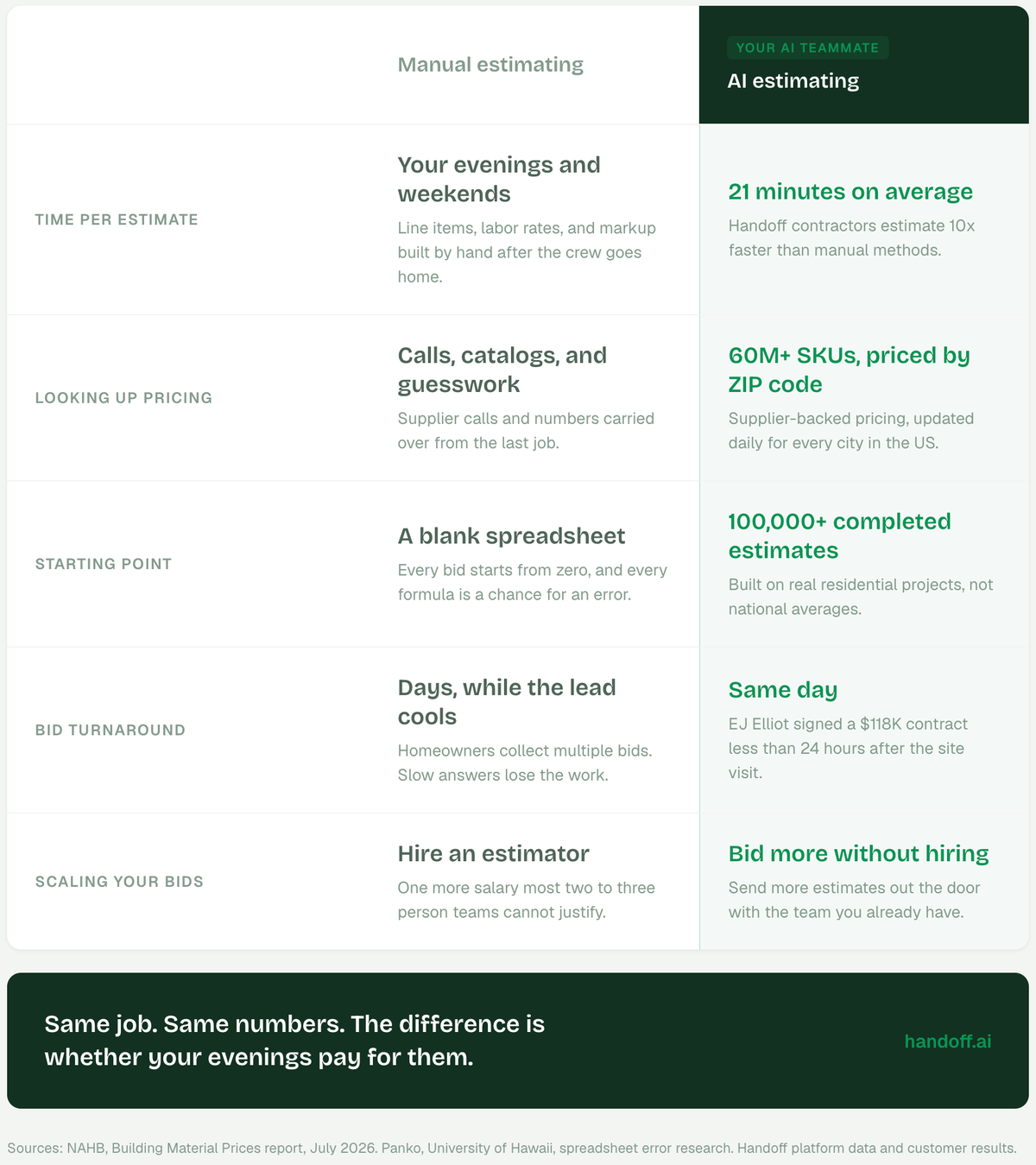
What AI estimating actually does and how it helps protect your margin
AI estimating is about removing the slow, repetitive parts so your judgment is the only thing left.
Here's what's actually happening under the hood when you use a tool like Handoff.
- Computer vision reads your plans and pulls quantities automatically — doors, windows, square footage — so you're starting from 90% done instead of zero.
- The system pulls live pricing from suppliers (that you select!), so your material costs reflect what things actually cost today, not what they cost six months ago when you last updated your spreadsheet.
- As you run more jobs through it, the tool gets sharper, learning from your actual project history.
The result is an estimate that takes an hour instead of a day, and one that's grounded in current data rather than memory and gut feel.
How to bring AI into your estimating workflow
You don't have to overhaul everything at once. Most contractors who switch to AI estimating do it in stages, and the first step alone is worth it.
Start with takeoffs. Upload your drawings and let the tool scan them. You still review everything — but you're correcting a near-complete list rather than building one from scratch. For most contractors, this is where the biggest time savings shows up immediately.
If you’re not on our Scale plan, contractors say starting with and estimate or a proposal is a great lead in to other tools like AI Client Portal and automated Follow Up Reminders. You automate the daily tasks so you can be where you actually are needed.
From there, let the AI tighten up your pricing. Handoff pulls live store pricing directly into your estimate, so you're not manually looking up what 2x6s cost at the lumber yard this week. Your bid reflects what the job will actually cost, which protects your margin and makes your number more competitive at the same time.
Once your quantities and pricing are set, the proposal generates automatically. The client gets a clean, professional document the same day. Not three days later.
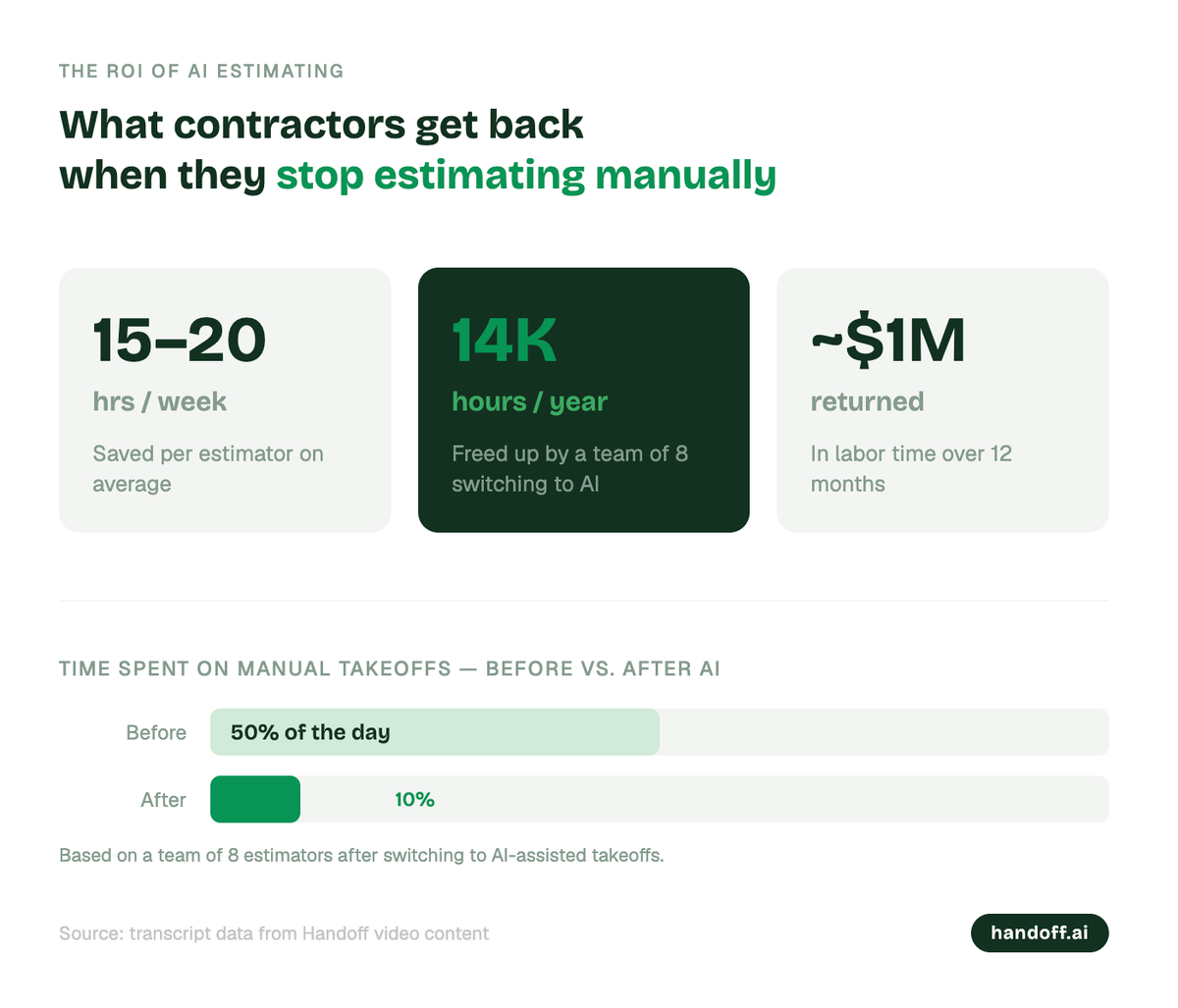
What the ROI of AI estimating looks like in practice
The math on AI estimating is pretty straightforward once you run it.
Contractors are saving 15-20 hours per week per estimator. For a solo operator doing five bids a week, that's time that can go toward taking on more work, spending less time at the desk, or both. Companies using AI in their estimating pipeline are also reporting significantly higher bid win rates — faster turnaround and tighter pricing both play into that.
What that means: a team of eight estimators shift to AI and cut the time spent on manual takeoffs from 50% of their day down to 10%. Over a year, that frees up close to 14,000 hours which is roughly a million dollars of labor time returned to the business.
For smaller residential operations, the scale is different but the principle holds. One additional closed job per month, because your bid came back the same day instead of three days later, more than covers the software cost.
Choosing the right AI estimating tool
Not every platform is built for residential work. The tools designed for large commercial GCs — Jobtread, Buildertrend, Procore, Buildxact — are built for operations with dedicated estimating departments and enterprise budgets. They're powerful, and they're overkill for a remodeling contractor running a crew of three.
For residential contractors, the questions that matter are simpler: Does it work on a phone? Is it easy enough that you'll actually use it on a busy week? Can you see how it calculated the numbers? Does it connect to the suppliers you already use?
Handoff is built specifically for this type of work: residential remodelers, custom builders, and GCs who need AI estimating, scheduling, and client communication in one place, without the learning curve or the enterprise price tag. Your AI Teammate handles the estimate, the proposal, and the follow-up, so the job moves from bid to signed contract faster.
A few things to watch out for
AI estimating works as well as the information you put into it. A few common mistakes worth avoiding:
- Avoid feeding the tool bad historical data. If your past project costs are inaccurate, the AI will learn from that. Clean up your numbers before you start relying on them as a baseline.
- Don’t skip the review step. AI estimating is a second set of eyes, not a replacement for yours. Always review what the tool generates before you send a proposal. After a few projects, thought, your AI Teammate will need less and less review.
- Roll it out with a clear process. Decide who owns the estimate, how it gets reviewed, and when it gets sent. The tool handles the labor but the process is still yours to define.
Where AI estimating is headed
The next wave of AI estimating will close the loop even further. Design options tested against budget in real time before plans are finalized. Digital twins feeding live site data back into your numbers. Estimates that update automatically as material costs shift.
The contractors who start building this into their workflow now will have a significant head start. The ones who wait are betting that their competitors aren't moving faster. That's a bet that's getting harder to win.
If you want to see how AI estimating works in practice, Handoff offers a free trial at handoff.ai.
Other FAQs about how AI estimating can increase your margin
Is AI estimating software accurate enough to use on real jobs?
Yes, with one condition: the accuracy depends on what you put in. AI estimating tools are highly accurate at reading plans and pulling quantities, but they learn from your project history — so the more jobs you run through the tool, and the cleaner your historical data is, the sharper the output gets. Most contractors find the estimates are more consistent than manual work from day one, and improve significantly after the first few projects.
How long does it take to learn AI estimating software?
For residential contractors, most platforms are usable within a day or two. The learning curve is usually around building your first estimate end-to-end — uploading drawings, reviewing quantities, and connecting your preferred suppliers for live pricing. After that first run, the process becomes faster each time. The tools built specifically for residential work are designed to be used on a phone on a job site, not by a dedicated estimating department.
Can AI estimating software handle specialty trades like electrical or plumbing?
It depends on the platform. General-purpose AI estimating tools handle structural scopes, material quantities, and labor well. For specialty trade scopes — electrical fixtures, plumbing rough-in, HVAC — some platforms pull those quantities from plans automatically, while others are better used alongside a subcontractor bid. The most practical approach for a residential GC is to use AI for your own scope and use the time saved to review and compare sub bids more carefully.
Ready to win more jobs with less manual work? Try Handoff free →