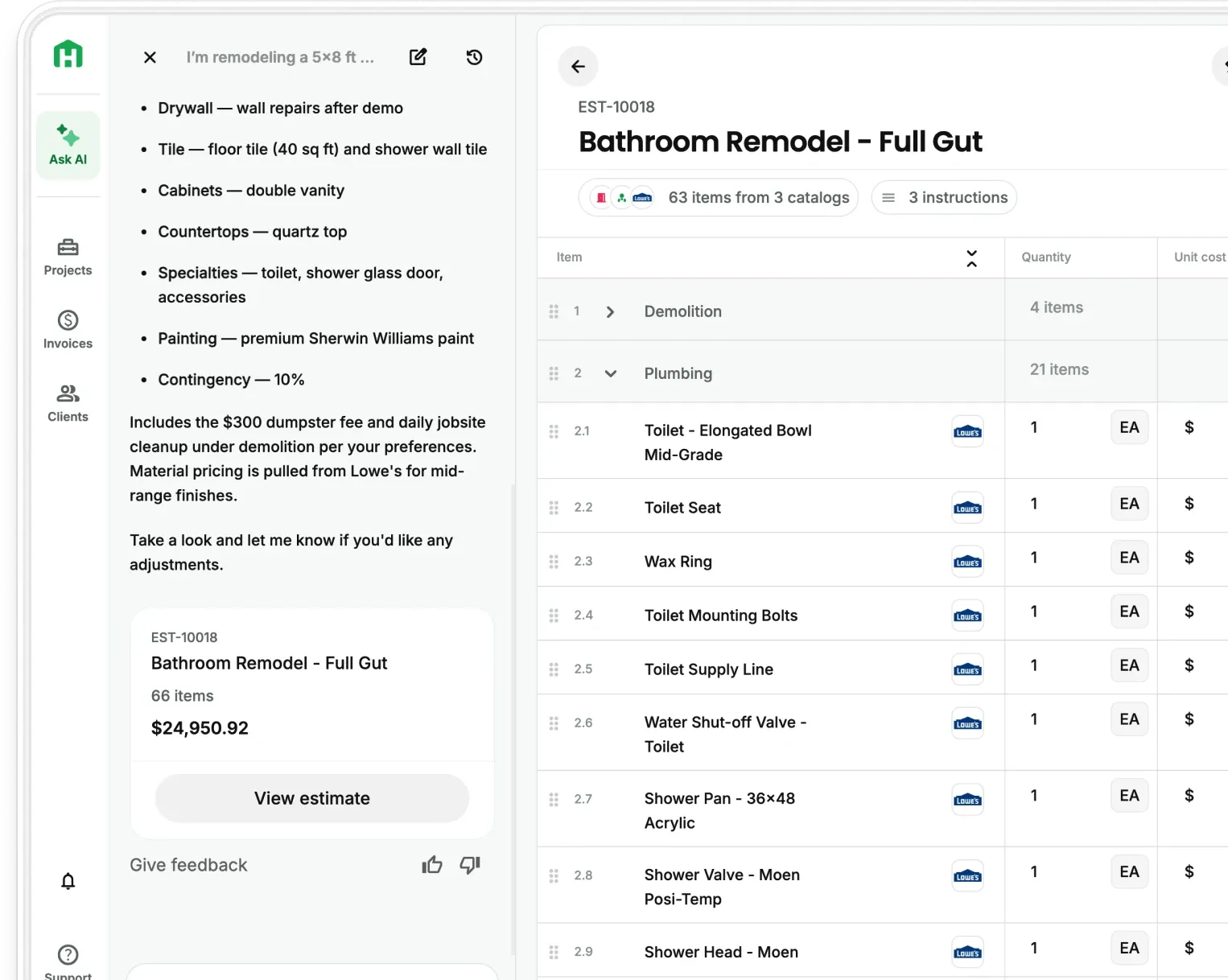
Outdoor kitchens are one of those scopes that looks straightforward until you're actually pricing it. Concrete, framing, electrical, gas, finishes, appliances, sometimes stucco, sometimes stone. And somehow you're supposed to pull all of that into one number, fast, without missing anything.
That's exactly the kind of project where AI estimating earns its keep. Not because it replaces your judgment, but because it builds the structure so your judgment is the only thing left.
In this post, we're walking through three real input methods contractors use to estimate a project like this inside Handoff — using the same outdoor kitchen as the example each time.
Want to see it in action first? Watch the full walkthrough here.
Why multi-trade estimates are where contractors lose the most money
The bigger the scope, the more places things fall through the cracks. A gas line forgotten. Electrical not included. Framing underestimated. Finishes left vague until the client picks something that blows the budget.
Manual estimating for multi-trade projects relies on memory — what did I remember to include? AI estimating works differently. It builds scope from context — what does this project actually require? That shift sounds small, but it's the difference between a protected margin and a job you lose money on.
Tools like JobTread, Buildertrend, and Buildxact give contractors a place to organize estimates and manage projects. What they don't do is generate the estimate from a site walk, a description, or a photo. JobTread does integrate with ChatGPT/Claude for prompting but you lose that single-pane-of-glass compatibility across your projects. And you still have to build the line items yourself. That's where the time goes, and that's where errors get introduced.
3 ways to estimate a project with AI
Method 1: Walk the site and let AI build the estimate
This is the most powerful input method, and the one that feels most natural for contractors who are already on-site.
Open Handoff, start walkthrough mode, and record video while narrating the project exactly the way you'd walk a client or a subcontractor through the space. For the outdoor kitchen, that sounds like: "Built-in grill here, griddle here, frame base about ten feet long, countertop across the top in polished concrete, electrical outlets here, gas line coming from the house." Take a few photos of the space and that's it.
Your AI Teammate reads the spatial layout, the materials you mentioned, the trade scope, and pulls quantities from scale and context. You get back a fully structured estimate with line items already created, instead of a blank spreadsheet.
For a multi-trade project, this alone eliminates the part of estimating that takes the longest: building the scope structure from nothing.
Method 2: Describe the project in plain language
No video, no site walk required. This method works when you already know the scope, you're estimating remotely, or you need a quick budget number from the driveway before you've even walked inside.
For the same outdoor kitchen, the input was: "Build a 10-ft outdoor kitchen with frame base, sheathing, and stucco finish. Install built-in grill, run a gas line from the house, two outlets, polished concrete countertop."
That description becomes trades, materials, labor, quantities, and line items automatically. Most contractors think in scope language, not line-item language. You think "10-ft grill island with power and gas." AI translates that into an estimate structure.
This is where Handoff diverges most clearly from platforms like Buildxact or JobTread. Both require you to work in line-item format from the start — you're building the structure manually, then pricing it. Handoff lets you communicate the way you naturally think and converts it from there.
Method 3: Upload plans, photos, or inspiration images
This is what most people expect from AI estimating, and it's where plan-heavy projects get a lot faster.
Upload the drawings, sketches, site photos, or even client inspiration images. Your AI Teammate reads dimensions, layout, visible components, materials, and installation context — then builds the estimate framework automatically. For the outdoor kitchen, that meant uploading an inspiration image, some rough plans, and a few photos of the space layout.
And if you have takeoffs you need, upload your full set of plans and Handoff will give you a color-coded takeoff drawing as well as a summary of assumptions, missing information, and plan crashes in under 2 hrs.
This method is strongest for designer plans, remodel layouts, and concept drawings. Anything visual becomes quantifiable scope.
Buildertrend has plan viewing built in, but it's a viewer. You still mark up quantities manually. Handoff reads the plans and generates the estimate from them. That's a meaningful difference in turnaround time on plan-heavy bids.
How Handoff compares to JobTread, Buildertrend, and Buildxact for AI estimating
All three companies are solid platforms for project management and financials. None of them offer AI-generated estimates from a site walk, voice description, or photo upload. Here's how the estimating capabilities stack up.
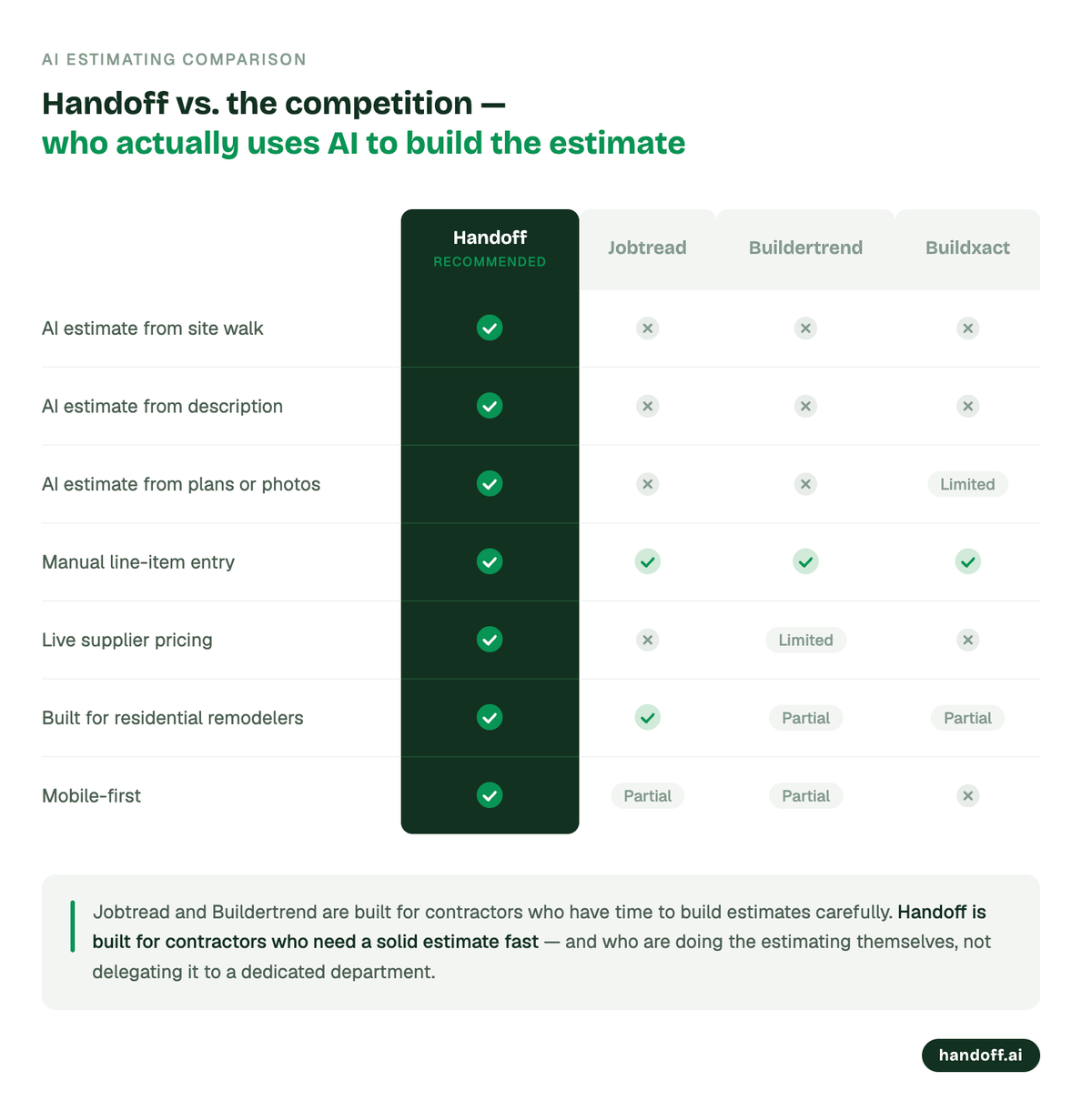
JobTread and Buildertrend are built for contractors who have time to build estimates carefully. Handoff is built for contractors who need a solid estimate fast but are manually estimating, not delegating it to a dedicated department.
The real shift in AI estimating
All three methods — site walk, text description, plan upload — produce essentially the same output. Same trades, same components, same project logic. The difference is just how you prefer to input the information.
That's the actual change AI estimating represents. You don't adapt to the software. The software adapts to how you already work. Walk it, describe it, show it and get back a complete scope with costs and markup already applied.
For a project like an outdoor kitchen, where missing one trade scope can cost you thousands, that's not a nice-to-have. It's how you protect your margin on every bid.
Try Handoff free at handoff.ai.
Other FAQs about the best AI estimating software for contractors
Can AI estimating handle multi-trade projects accurately?
Yes. And multi-trade scopes are actually where AI estimating shows its biggest advantage. When you're coordinating concrete, framing, electrical, and gas in one estimate, manual entry creates more opportunities to miss something. AI builds scope systematically from context, so trade items get included based on what the project requires rather than what you remember to add.
Do I need to be on-site to use AI estimating?
No. Handoff supports three input methods: a site walkthrough video, a plain-language description, or uploaded plans and photos. Remote estimating from a description or a client's inspiration images works well for budget conversations and preliminary bids before a formal site visit.
How does AI estimating compare to using Buildertrend or JobTread?
Buildertrend requires you to build estimate line items manually — the platform organizes and tracks the estimate once it exists, but the scope-building is still on you. JobTread has added AI-assisted estimating via MCP integration with ChatGPT and Claude, which can draft estimates from text prompts — but it requires external tool setup outside the platform. Neither supports generating a scope from site photos, walkthrough video, or uploaded documents. Handoff generates the estimate structure directly from your input — no third-party AI wiring required — which cuts the time from scope to proposal significantly for residential contractors doing their own estimating.