If you bid trade work, you already know where your week goes. The plans come in Thursday, the bid is due Monday, and somewhere in between you are on the couch with a highlighter counting fixtures.
Most contractors doing this work do not have an estimator. They are the estimator. They are also the person on the job site, the person buying material, and the person calling the homeowner back.
That’s the real problem AI takeoff software has to solve. Not measuring faster. Getting the takeoff off your plate entirely.
Why manual takeoffs cost subcontractors more than just time
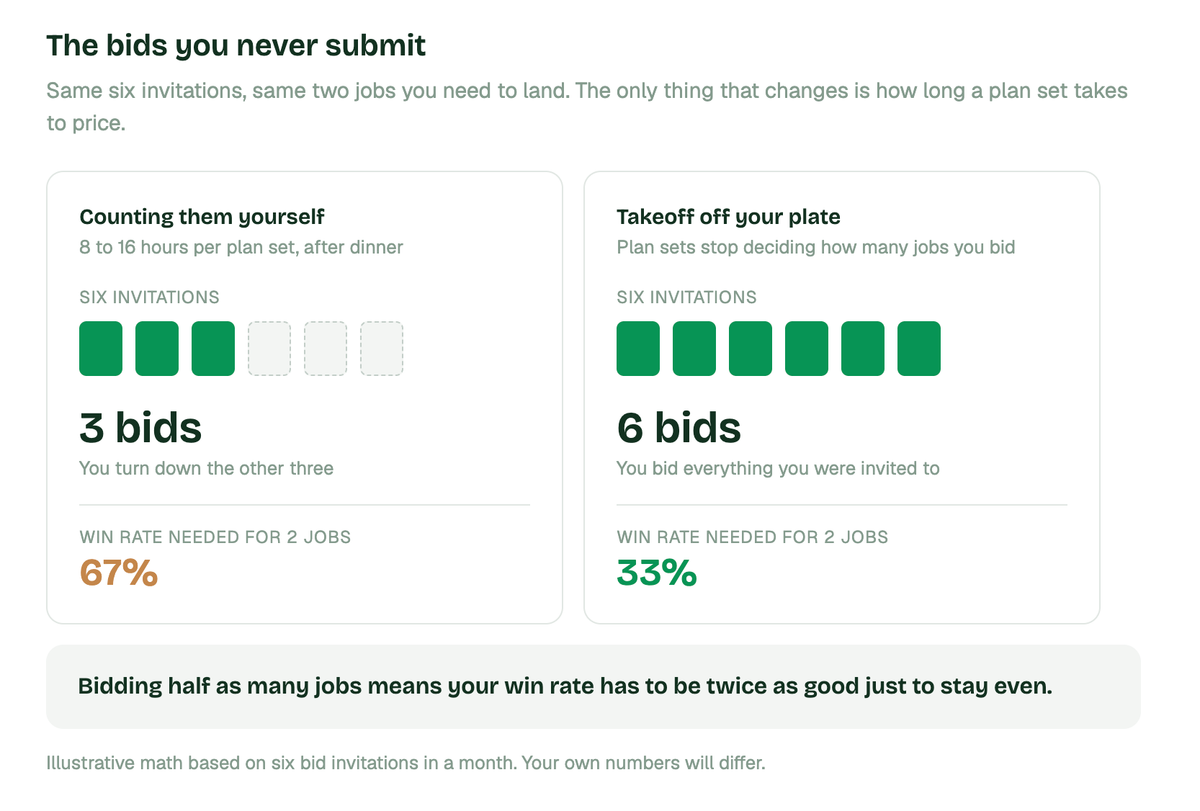
The time is the obvious cost. A full manual takeoff runs 8 to 16 hours depending on scope, and most of that happens after dinner.
The bigger cost is the bids you never submit. When a plan set takes you two nights to price, you turn down invitations. You bid three jobs instead of six, so your win rate has to be twice as good just to stay even.
Then there’s the hiring problem. According to the Bureau of Labor Statistics, cost estimators earn a median wage well above what a two or three person shop can carry as overhead. So you do not hire one. You stay up later instead.
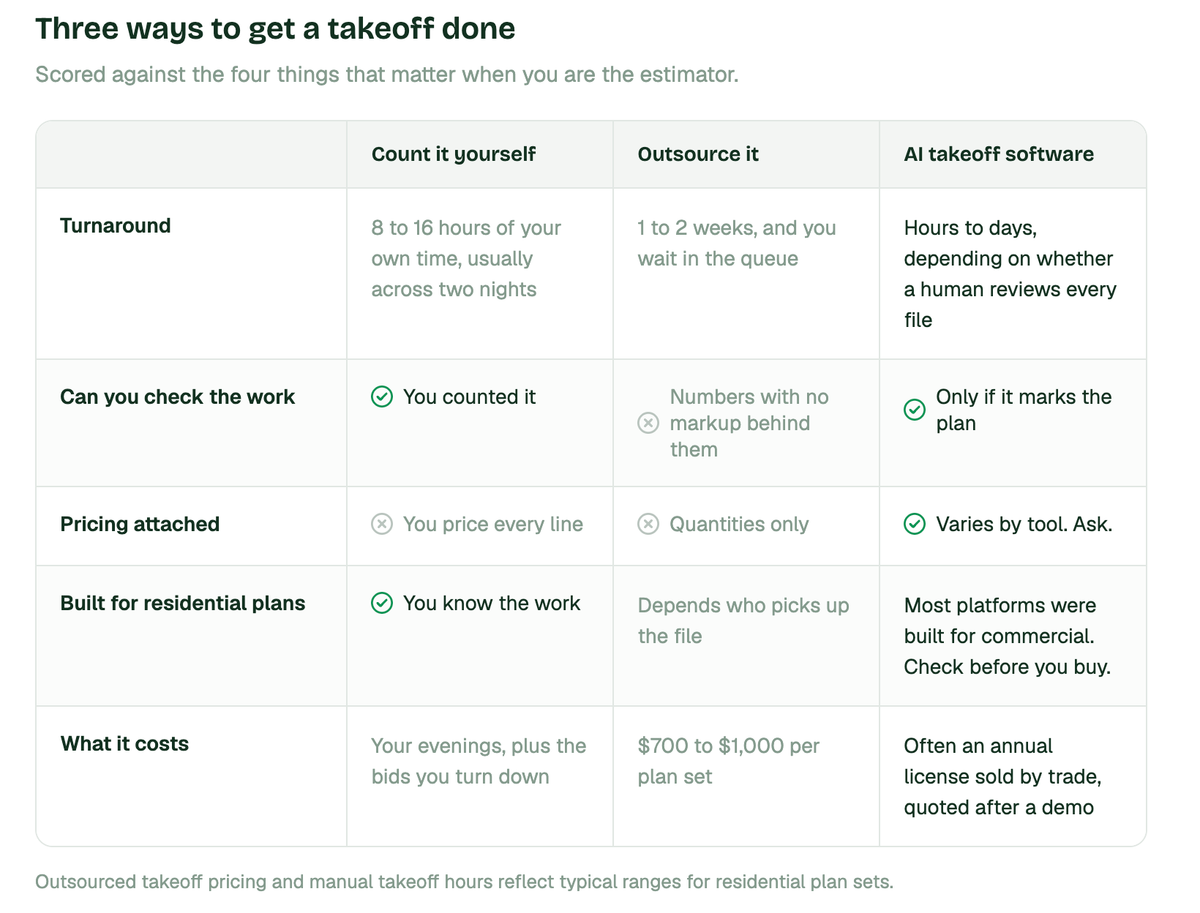
Outsourcing is the usual escape hatch, and it has its own math. Takeoff services generally run $700 to $1,000 for a typical residential plan set, with a one to two week turnaround. That solves the labor and creates two new problems: you wait, and you get back numbers you cannot check.
How AI-based takeoff software works
The workflow is roughly the same across tools.
You upload a plan set as a PDF. You confirm which trade scope you are bidding. The software reads the drawings, identifies the areas and assemblies that belong to your scope, and returns measured quantities. Most tools then let you export to Excel or a PDF you can send.
The differences show up in three places, and they are the questions worth asking on any demo.
- How long does it actually take? Some tools return results in hours. Others route every takeoff through a human quality assurance team, which pushes delivery to one to four days depending on the trade and how busy the queue is. Both approaches are defensible. However, they’re very different when the bid is due Monday.
- Do you get quantities, or a priced estimate? Most takeoff software hands you counts. You still open a spreadsheet and price every line against current supplier costs. That second step is where the evening actually goes.
- Can you check the work? A takeoff you cannot verify is a takeoff you have to trust blindly. Look for output that marks every measurement on the plan itself, so you can spot the room it missed before you send the bid.
What to look for as your own estimator
If you run a small shop, the buying criteria are different from what a commercial precon team needs.
- Turnaround has to beat your bid window, not your old process. Saving 90% of the measuring time does not help if delivery still takes four days and the GC needs numbers Friday.
- Output has to be verifiable. You are the last set of eyes. A color-coded plan showing what was counted and where lets you catch a missing scope in ten minutes instead of finding it in month two.
- Pricing has to be attached, or you’ve only solved half the problem. Quantities without current material costs means you’re still doing the part you hate.
- And the software has to know residential work. A tool trained on commercial mechanical drawings will read a kitchen remodel poorly, because the drawings, the assemblies, and the level of detail are nothing alike.
Where most AI takeoff tools fall short for residential work
Most AI takeoff platforms on the market today were built for commercial construction.
You can see it in how they organize themselves. The trade lists run to HVAC, structural steel, civil, utility and earthwork, and paving. The customer stories are steel fabricators and mechanical contractors. The pricing is an annual license sold by trade, quoted after a demo.
Residential plan sets are smaller, less standardized, and often incomplete. Half the time you’re working from a homeowner's sketch and a set of photos rather than a stamped drawing package. Software trained on commercial documents doesn’t handle that gracefully, and the annual license priced for a precon department doesn’t fit a shop doing $1M.
3 questions to consider when looking at an AI takeoff software
Can one tool handle multiple trades?
Usually yes, and this matters more in residential than in commercial.
A commercial sub bids one trade. A residential contractor might frame a deck in April, tile a bathroom in May, and run a full kitchen in June. If your software only handles one scope, you’re back to counting by hand for two thirds of your work.
Ask whether the tool covers the assemblies you actually bid across a year, not just the one you bid most often.
How AI takeoff software handles plan revisions
Revisions are where takeoffs quietly go wrong.
The GC sends an addendum Friday afternoon. Two rooms changed. If you re-count the whole set you lose the evening, and if you eyeball it you miss something.
Good software makes the comparison for you and shows what changed between versions, so you are reviewing a short list instead of rebuilding the takeoff. When you evaluate tools, ask specifically what happens when a second version of the plans arrives. The answer separates the serious products from the demos.
What AI takeoff software costs
Pricing in this category is inconsistent and often hidden behind a demo request.
Commercial-focused platforms typically sell annual licenses priced by trade. That structure works when a takeoff budget already exists on the org chart. It works less well when the budget is your own paycheck.
The number to compare against is what you spend now. If you outsource at $700 to $1,000 per plan set and bid two jobs a month, that is money leaking every month. If you do them yourself, price your own hours honestly, including the ones after 8pm.
Whatever tool you choose, the payback question is the same: does it return the takeoff inside your bid window, and does it save enough hours to be worth what it costs?
Getting a takeoff back before the bid is due
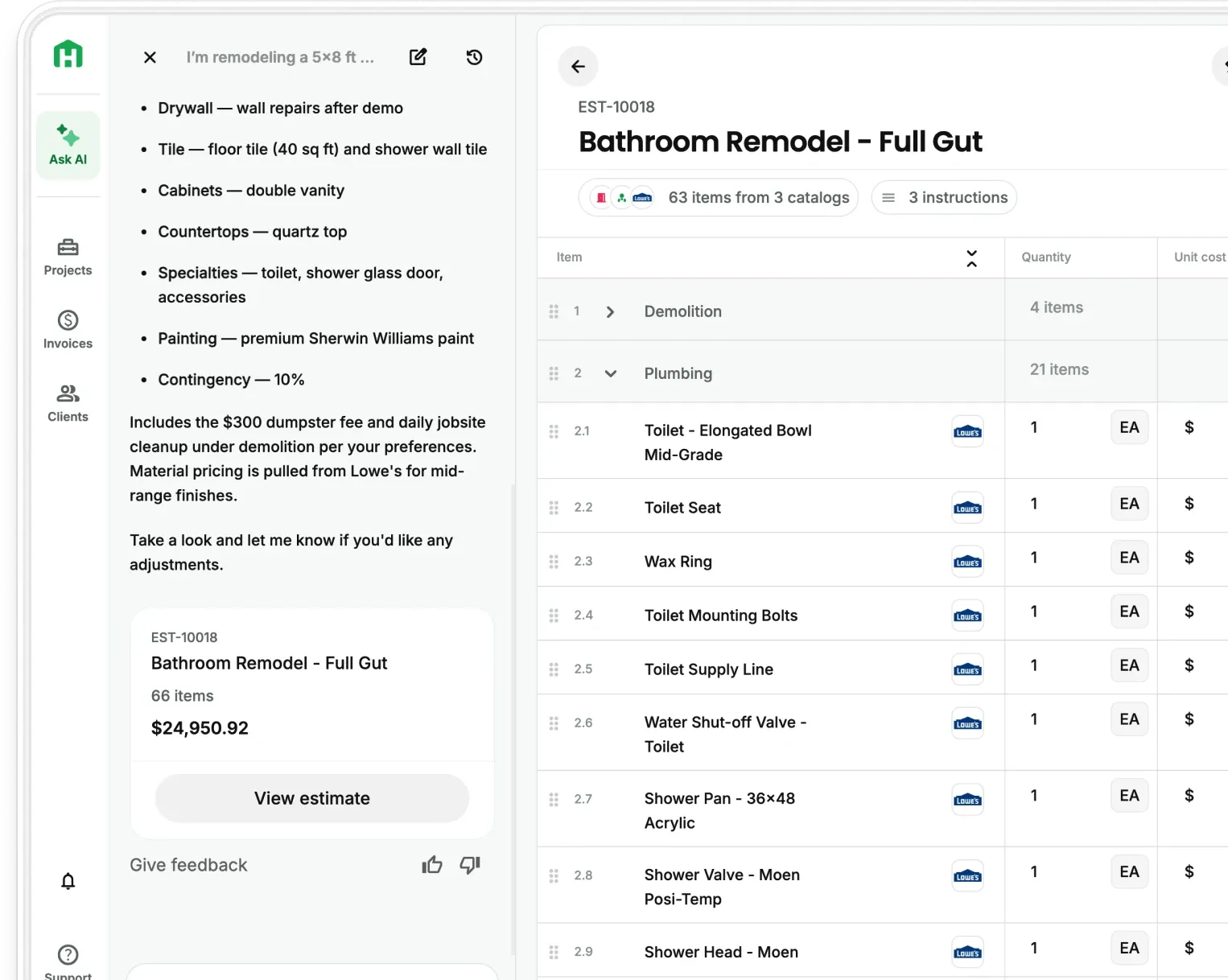
Handoff AI Takeoffs was built for residential work specifically. You upload the plans, and your AI Teammate returns a complete takeoff in under 2 hours.
What comes back is a color-coded plan marking every area and item measured, a written summary flagging assumptions and anything missing from the drawings, and quantities already priced against current supplier costs for your zip code. No queue, no measuring, no second night pricing it out.
Here is how to start:
- Create your free account at app.handoff.ai/sign-up
- Upload the plan set for a job you are bidding this week
- Review the marked-up takeoff and check the areas you know are tricky
- Adjust any line where you price differently
- Send the bid the same day the plans landed
The takeoff was never the part of the job you wanted to do. Handoff does it for you.
Common questions about AI takeoff software
Is an AI takeoff accurate enough to bid from?
It depends on whether you can verify it. A takeoff that shows you every measurement on the plan lets you check the areas you know are tricky before you commit, which is more than an outsourced service gives you. Treat the output as a very fast first pass by a competent estimator, then apply your own judgment to the parts of the job you know best.
What happens when the plans are incomplete?
This is normal in residential work and the software should tell you about it rather than guessing. Look for output that flags missing dimensions, unclear scope, and conflicts between sheets, so you know exactly which questions to send back to the GC or homeowner before you price it.
Do I still need to know how to do a takeoff by hand?
Yes. The software removes the labor, not the judgment. You still need to recognize when a count looks wrong, know which assemblies your local inspector will question, and understand what the drawings left out. Contractors who bid well with AI are the ones who already knew how to bid.