Custom Domains lets Scale customers use their own domain on client-facing links and their own address on emails. Proposals, invoices, portal links, and emails can now come from your business instead of Handoff.
Available now on the Scale plan.
Keep your software behind the scenes
Right now, a client opens your proposal and the link uses hndff.com. An invoice lands in their inbox from noreply@handoff.ai.
Your software shows up at the moments when the client should be focused on your business. That includes the proposal competing against two other bids, the invoice waiting to be paid, and the portal link a client opens for the first time.
Some contractors work around this by downloading proposals and resending them as PDFs or building a second website just so estimates go out from their own address.
Custom Domains removes those extra steps. The link a client opens and the email carrying it both come from your business.
What does Custom Domains cover?
Every client-facing link uses your domain
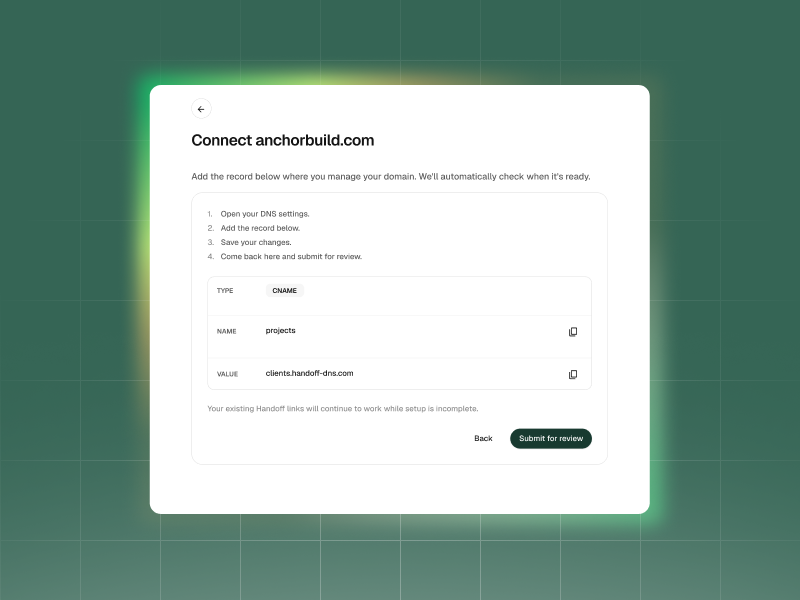
Connect your domain once, and links copied or sent from Handoff use your business address:
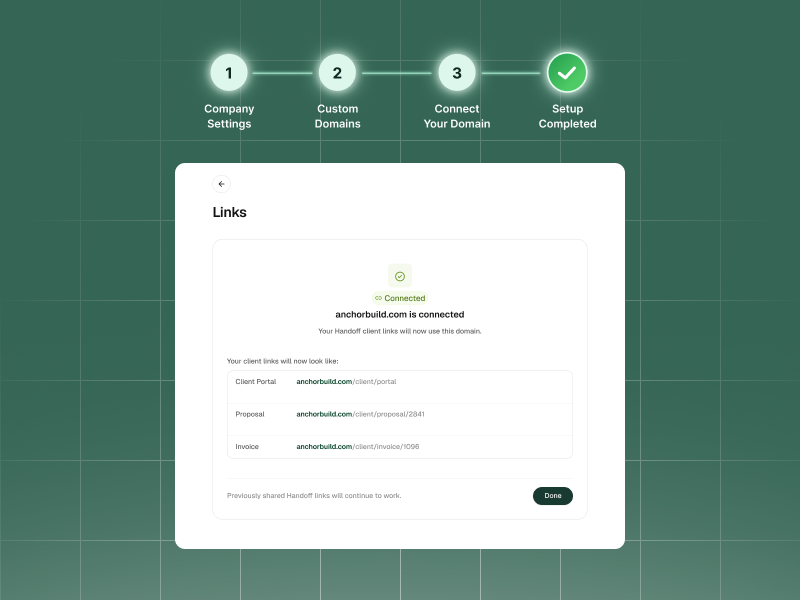
- Proposals, invoices, and the client portal open from your address instead of Handoff’s.
- Documents, daily logs, and shared files use the same address throughout the project.
- Sub and vendor portal links also use your domain.
- Old links keep working with their original Handoff address. Any link you copy or send from Handoff after setup uses your domain, including links for older proposals and invoices.
- Your logo appears as the site icon when a client opens a page through your custom domain.
Every email comes from your address
Once your links are connected, you can set up email from the same place:
- Client and vendor emails come from your address with no “Via Handoff” in the message.
- Replies go straight to your company email, just as they would if you sent the email yourself.
- White-label email content removes Handoff branding from the email itself. Scale customers can go to Settings → Company settings → Brand and turn on Send emails with your own branding, even without connecting a custom domain.
Nothing switches over until it’s confirmed working. If the connection stops working later, new links and emails return to Handoff’s address, and you receive a notification explaining what needs attention. Links already sent on your custom domain will start working again once the connection is fixed.
How to connect your domain
Links and email are both set up under Settings → Custom Domains. Links are connected first, followed by email.
For links:
- Enter your domain. Your links will use an address like share.acmebuilders.com.
- Add two settings where your domain is managed. You can also email the instructions to whoever manages your website.
- Handoff checks the connection automatically. This usually takes a few minutes, but DNS changes can sometimes take longer, and the status will change to Connected, and any link you copy or send from Handoff uses your address.
For email:
- Choose the name that appears before the @.
- Add three more settings where your domain is managed.
- Send yourself a test email. When it arrives, click Turn on sending. Client and vendor emails will then come from your address.
Available now on the Scale plan
Custom Domains is live for Scale accounts and can be set up entirely from Settings → Custom Domains.
Ready to put AI to work for your business?
See how Handoff helps contractors automate estimates, proposals, and follow-ups so you can focus on building.
Other FAQs about Custom Domains
What happens if I disconnect my domain?
Links already sent on your custom domain stop working, so you’ll need to resend anything a client still needs to open. Nothing is lost. The same proposals and invoices remain available through Handoff, and new links and emails use Handoff’s address. Your custom email also turns off.
Do I need my own domain to use Custom Domains?
Yes. You need a domain to use your own web address on links and your own email address.
Without a domain, Scale customers can still go to Settings → Company settings → Brand and turn on Send emails with your own branding to remove Handoff branding from email content.
What happens if my Scale plan lapses?
Nothing changes until your paid period ends. After that, links already sent on your domain stop working, and new links and emails use Handoff’s address.
If you resubscribe, you’ll need to set up links again. Your existing DNS records will still work, so you won’t need to change anything with your domain provider. Once links are reconnected, old links on your domain will work again. Custom email must be set up again from the beginning.