It's 6:40 on a Friday and you're sitting in the truck with a stack of receipts from the supply house. The bathroom job felt tight all week. You just don't know if it's tight by $400 or by $4,000. That gap between a feeling and a number is where margin goes. Here's how to close it, from the approved estimate to the final invoice.
Why do actual costs end up different from the estimate?
Actual costs drift from the estimate because prices move. So small items go unpriced and the scope changes. Then labor runs longer than planned.
- Material prices move: An estimate written in August can be stale by October. Construction Dive reported in September 2026 that copper wire is up 27.2% year over year, and the Associated Builders and Contractors chief economist said ongoing input price increases are "likely to weigh on profitability over the next several months."
- The small stuff: Caulk, brackets, fasteners, and tape rarely make it into a hand estimate, and they always make it onto the receipt.
- Scope changes: One more outlet, a wider doorway, a different tile. Each one is small until you add them up.
- Labor: The demo that looked like a day and ran two.
The average net profit margin for remodelers in 2024 is 6.3%, according to NAHB's latest study. Gross margin averaged 29.9%.
On a $40,000 job, a 6.3% net margin is about $2,500 of profit. A few unlogged supply runs can take a big bite out of that. But tracking costs as they happen keeps you in control of the margin you priced in.
How do you turn an estimate into a job budget?
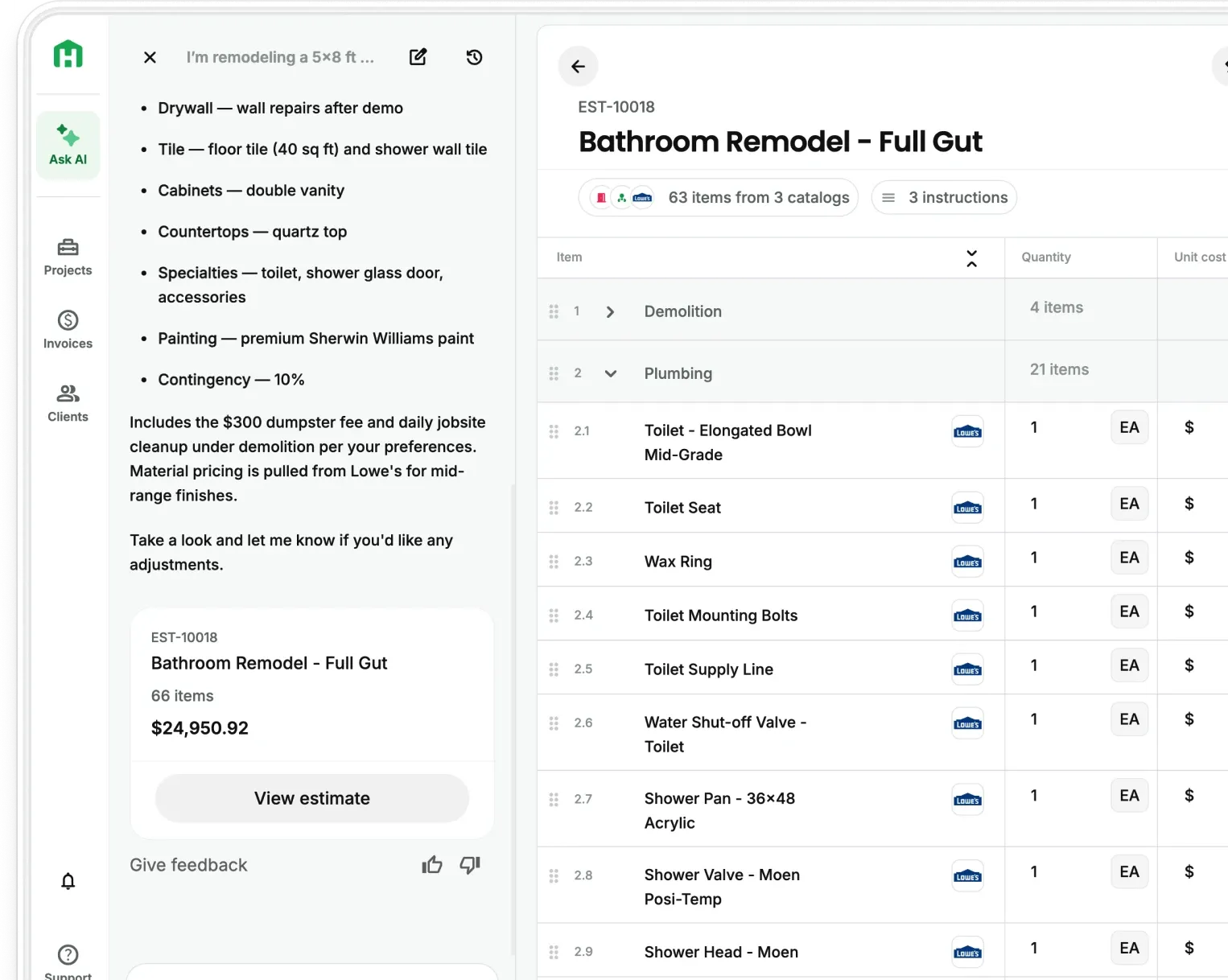
Use the approved estimate as the baseline, with the same sections, the same lines, and the same totals, so every cost you log later maps to something you already priced.
- Keep the lines you priced: Don't build a second list. Budget by section and by line item so a surprise shows up in the exact spot it happened.
- Add change orders as they're signed: The budget should move with the contract, so you're always comparing against the current price.
- Pick a check-in day: One day a week, same time. Friday afternoon works well, since the week's receipts are all in the truck.
With Handoff, AI Budget Tracking handles the first step for you. When an estimate is approved, it becomes the project's budget by section, by line item, and by total remaining.
What should you track on every job?
Track materials, crew hours, change orders, and daily site notes, and tie each one to an estimate line the day it happens.
"The biggest killer in construction for margin is the big-box runs."
Tony DiSilvestro, Ynot Build
Photograph every receipt the day you get it. Your AI Teammate reads the vendor, date, amount, and line items, then suggests which estimate line each cost belongs to. You approve it, edit it, or leave it unmatched.
Your crew clocks in from the same app you use for estimates and invoices. Hours attach to the project, and once you approve them they show up as labor cost in the budget while the job's still running. Time Tracking is on Pro and Scale, and Scale adds subcontractors and vendors through the Subcontractor Portal.
Write it up the day the client asks. AI Change Orders build a mini-estimate that shows what's different from the original agreement, go to the client for signature with photos attached, and stay tied to the original job. Pro Remodeler's rules for change orders say to price the change accurately and collect payment before the work starts. Change orders are part of the AI Project Management Suite on Pro and Scale.
Also include a dated record of what happened on site, so a cost question three weeks later has an answer. AI Daily Logs keep it in the same project, also on Pro and Scale.
Should you use a spreadsheet or software for tracking job costs?
What each one does well
A spreadsheet works for one or two jobs when you've got an evening each week to keep it current. Software starts earning its place once costs arrive from the truck, the supply house, and the crew at the same time.
- Spreadsheet: Free, familiar, and fully yours. It runs on you typing in every receipt and rebuilding the layout for each new job.
- Accounting software: Your accountant keeps the books, and that's the right home for them. Job costing is the line-by-line view while the job's still running.
- A contractor job tracking app: It starts from your estimate, so the budget's built before the first receipt shows up. Handoff's project management covers the schedule, budget, crew hours, change orders, daily logs, and client portal in one app, on Pro and Scale.
Handoff gives you one system from estimate to completion, so the numbers don't live in five places.
How often should you compare actual costs to your estimate?
Compare weekly while the job's running, any time a big purchase or signed change order lands, and once more when the job closes.
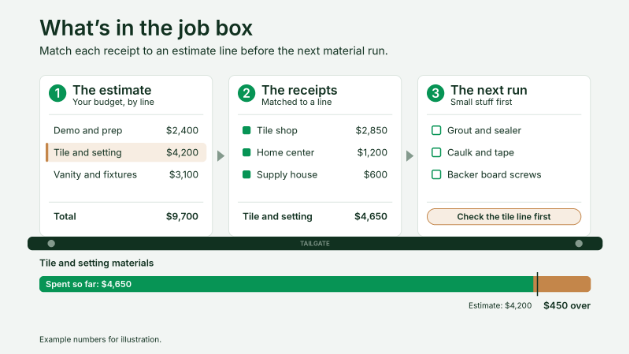
Ten minutes a week is all it takes. Look at what you've spent, what's left, and which lines are over. Say your estimate has $4,200 for tile and setting materials, and the receipts so far total $4,650. That's $450 over with the floor still to finish, so you can adjust the rest of the job. Found at the final invoice, that margin's gone.
Here are two others to stay on top of:
- The trigger check: After a supply house run over an amount you set, and whenever a client signs a change order.
- The close-out check: When the job wraps, compare final costs to the estimate and note which lines moved. Your next estimate starts from real numbers. Our guide on spotting money-losing estimates and the markup vs margin breakdown go deeper on what to change.
The Budget vs Actuals feature of AI Budget Tracking shows what you estimated, what you've spent, what's left, and where you're over, by section and line item. It updates as costs come in. The project summary also shows total invoiced next to total spent, so billed gross profit sits on the same screen. Milestone Invoicing lives in the same app and is included on every plan.
Start tracking your job costs
- Start your free 7-day trial. No credit card required.
- Build an estimate and approve it. AI Budget Tracking turns it into your project budget.
- Upload your first receipt and see which line it lands on.
- Check Budget vs Actuals every Friday.
Your margin gets decided one receipt at a time. Handoff keeps every one of them tied to your estimate.
Other FAQs about job costing
What's the difference between an estimate and job costing?
An estimate is the price you plan to charge, based on the costs you expect. Job costing is tracking what the job actually costs as it runs. Comparing the two shows your real margin on each job and tells you what to change in the next estimate.
Can you track job costs from your phone?
Yes. Handoff has iOS and Android apps, so you can manage a job from the truck, and your crew can clock in from the app (Time Tracking is on Pro and Scale). A contractor job tracking app should work where you work, and that's the job site.
Do small jobs need job costing?
Yes, in a lighter form. A $10,000 job has the same supply runs and the same surprises, just fewer lines. Even one check at the end shows you which lines moved.