Handoff now includes AI Business Advisor, a way to ask your AI Teammate to understand what's happening across your business from one screen.
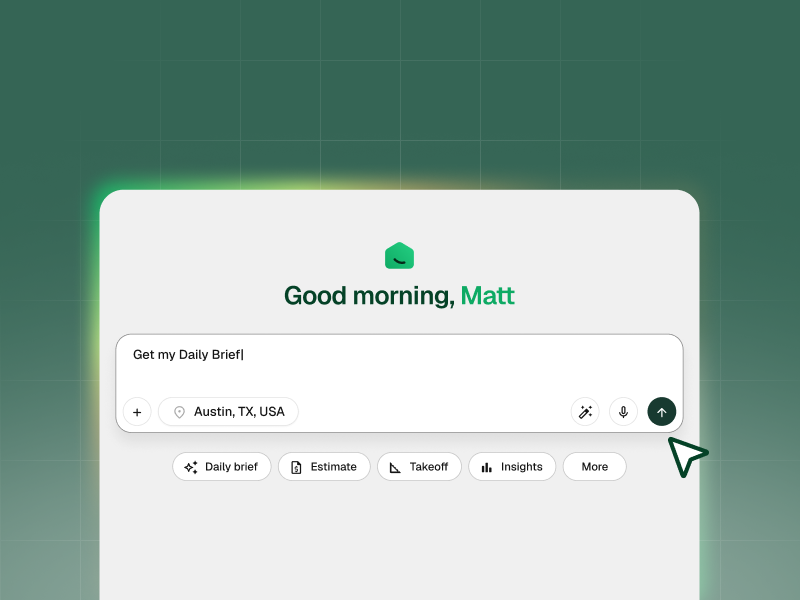
Ask for a Daily Brief, and get the 3-5 items that need your attention today. You can also ask which projects are over budget, who owes you money, or what you can bill this week.
Every answer comes from your own Handoff records, includes the data behind it, and links back to the original project or record. Anything that reaches a client or affects your books waits for your approval.
Everything you need to know, from one screen
To answer a question as simple as "Am I making money on the Henderson project?," you open the project, then the budget, invoices, and payments, then do the math yourself . Do that across six active jobs and it becomes an evening of checking records.
That's how a deposit sits uncollected for a month. It's how a proposal that needed one phone call goes quiet and gets awarded to somebody else. It's how a job runs 15% over and nobody notices until the last invoice doesn't cover what's left.
You need somebody to tells you what needs your attention and shows you the records behind every answer.
What you get with AI Business Advisor
- A Daily Brief, capped at five items. Ask for it and your AI Teammate shows you what needs attention today. Each one says what happened, why it matters, which job or client it's about, and what you can do next. Overdue invoices, missing deposits, proposals going cold, work that's ready to bill, jobs over budget. When nothing's urgent, it tells you that instead of padding the list.
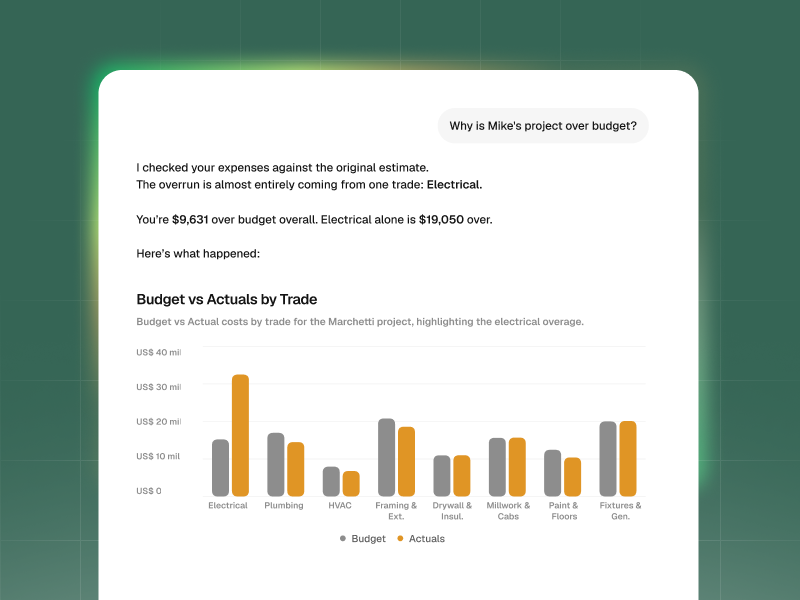
- Answers to your own questions. Type or say it however you'd say it to a person. Which jobs are over budget. Who owes me money. What can I bill this week. What's my proposal win rate. Where am I making money. You'll get a short answer in plain language plus the chart, list, or job breakdown that backs it up.
- Six questions already built for you. Open Insights when you don't know what to ask, and start from the questions most owners need answered: who owes me money, are my jobs making money, am I over budget anywhere, how is my cash trending, what can I bill right now, am I winning enough work.
- A way into the actual record. Open the project, budget, invoice, or proposal behind any answer. Your AI Teammate stays with you while you're in there, so you can keep asking without repeating which job you meant.
- The next step, ready to go. Your AI Teammate can prepare what comes next, like a payment reminder or an invoice. Anything customer-facing, anything that hits your books, and anything you can't undo waits for you to review and approve it.
A dashboard shows you numbers. An advisor tells you what to do.
Most construction software shows you a chart of receivables and leaves you to figure out what it means and what to do next.
AI Business Advisor adds the context behind the number. It tells you what changed, why it matters for the project, and what you can do next, using records you can open and verify.
If information is missing or out of date, your AI Teammate tells you instead of filling the gap with a guess.
How to Get Your First Business Insights
- Open Home and ask for your Daily Brief.
- Read the first item, then open the project or invoice behind it.
- Ask a follow-up question without restating which project you mean.
- Open Insights and pick one of the six built-in questions to see how a full answer comes back.
- Approve or edit any next step your AI Teammate prepares before it goes anywhere.
AI Business Advisor works from the projects, proposals, invoices, payments, and budgets already in your account. The more of your business you manage in Handoff, the more complete its answers become.
Works with everything your AI Teammate already builds, including AI Job Costing budgets and AI Invoicing.
Available on Pro and Scale.
Other FAQs about AI Business Advisor
Where do the answers come from?
Your own Handoff records. Projects, budgets, proposals, invoices, and payments in your account. Your AI Teammate doesn't estimate a number it can't find, and it doesn't present an assumption as a fact. When data behind an answer is missing or out of date, it tells you that as part of the answer, so you know whether to trust it or go fix the source.
Will it send things to my clients on its own?
No. It can prepare the next step, like drafting a payment reminder or getting an invoice ready, but anything that reaches a client, touches your accounting, or can't be undone stops for your review. You approve it or you change it first.
What if my Handoff records aren't complete?
You'll still get answers, but they'll be narrower, and your AI Teammate will tell you where the gaps are. Contractors managing proposals, invoices, payments, and budgets in Handoff get the most complete answers. If you're keeping some of that in a spreadsheet, that's the piece to move over first.