For most residential remodeling shops, one app is the better setup, with your accounting software connected to it. Several apps can work, but only when they pass information to each other on their own. Here's a simple test: if you're the one copying numbers or dates from one app into another, your setup is costing you time and money. Let’s break down how to tell which side you're on and what AI estimating changes.
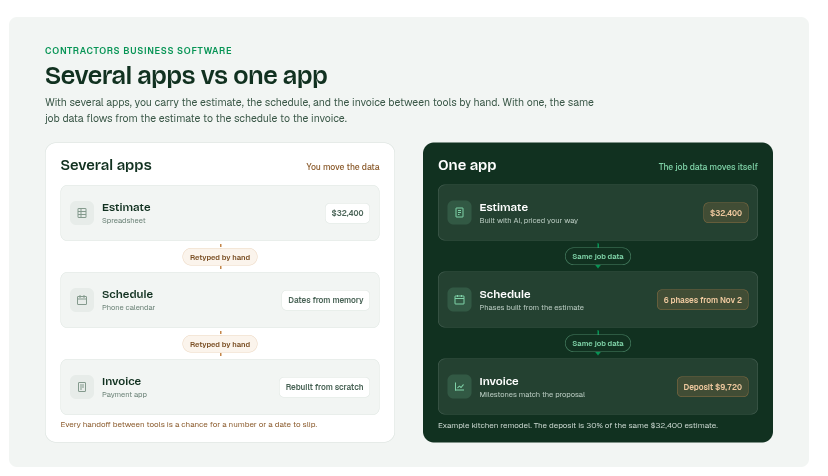
One app vs several apps for a remodeling business: who is moving the information?
One app wins for most 2 to 5 person remodeling shops, because nobody on the team has time to be the link between tools.
- One app: The estimate, schedule, and invoices share the same job. A change in one shows up in the others.
- Several apps: Each tool may be great at its one job, but someone has to keep them in sync.
- Who this fits: According to NAHB's member census, the median remodeler does about $1.7 million a year with around five people on payroll. That's a team where the owner usually does the syncing.
Here’s a deciding question to consider when weighing one app or several: Do you apps talk to each other, or do you talk to each of them? One app keeps a residential remodeling business in control without adding more to the owner's plate.
Why contractors end up with five apps for one job
Most contractors add apps one at a time to fix one problem at a time, and the apps were never built to work together. Those apps are individual businesses that need to holistically serve your unique businesses. That’s an issue across the board.
- Estimating: A spreadsheet or an estimating tool you picked years ago.
- Scheduling: A phone calendar, a whiteboard, or a group text with your subs.
- Invoicing: Your accounting software, or a payment app the homeowner already uses.
- Everything else: Photos in your camera roll, notes in a notebook, change orders in your texts.
49% of construction pros who move data between their apps do it by typing it in by hand, according to JBKnowledge's 2020 ConTech Report. Only 5% said all of their apps connect.
Each new app solved a real problem. Together, they made a new one: you became the person who holds it all together.
Where numbers and dates get lost between apps
The gaps between apps, not the apps themselves, are where jobs lose money and time. Research from Raymond Panko at the University of Hawai'i found people get individual spreadsheet formulas right about 95% to 98% of the time. Across 100 formulas, the odds of an error somewhere top 85%.
So things like spreadsheets and drifting dates with invoices that don’t match all work together against your business. There’s lost context all over the place which is causing you more time and ultimately, money.
If you're the one carrying numbers from one app to the next, you're the integration.
Keeping estimates, schedules, and invoices in one place protects your margin from the start.
How AI estimating connects estimates, schedules, and invoices
The estimate becomes the starting point for everything else. When AI estimating lives in the same app as scheduling and invoicing, the estimate you build once feeds the whole job.
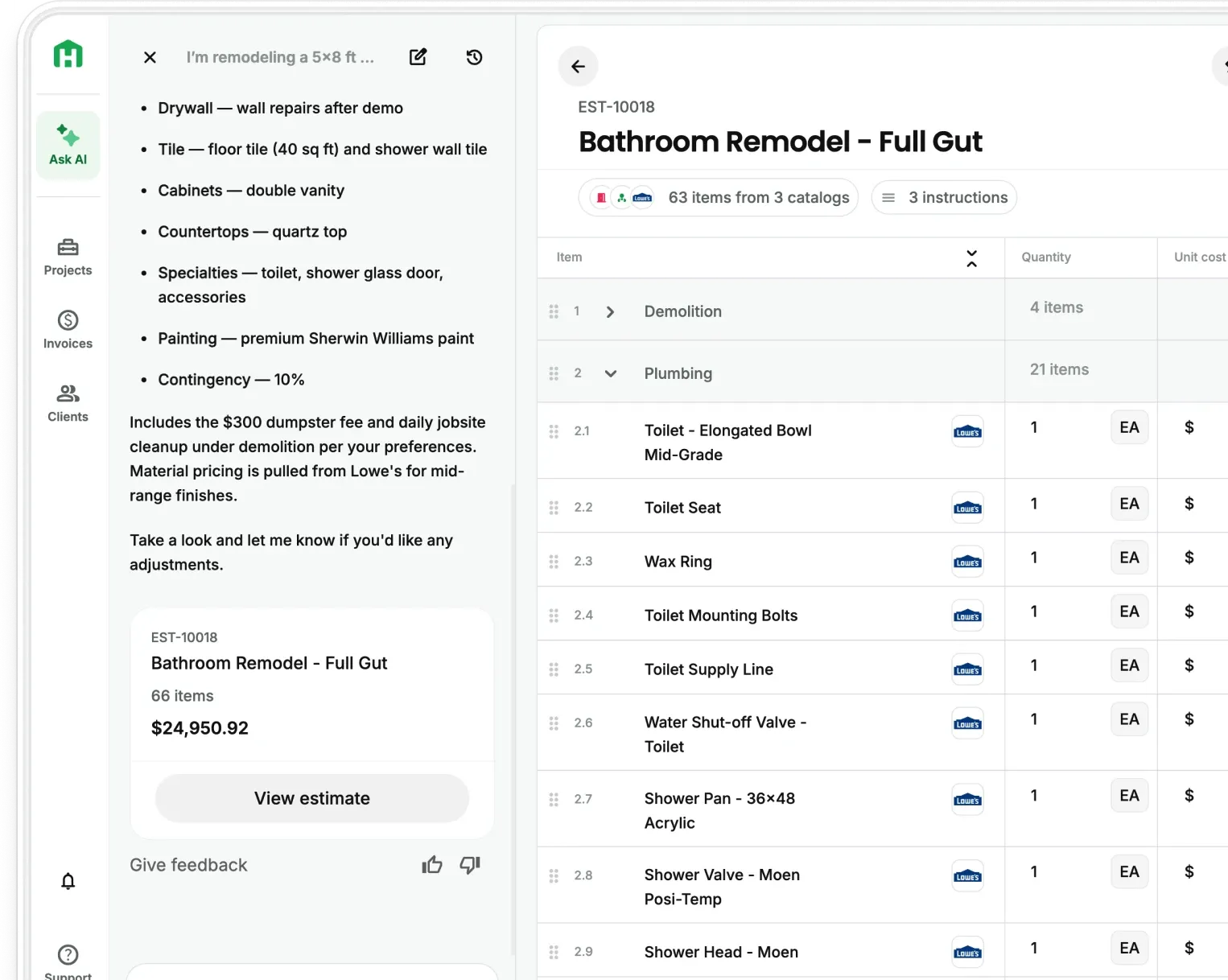
- Estimate: Describe the job, talk it through on site, or upload plans and photos, and your AI Teammate builds the estimate with local pricing.
- Schedule: Pick a start date, and AI Scheduling turns the estimate into a project schedule with phases in order.
- Invoices: Milestone invoicing bills in stages as the work gets done, with photos attached as proof of progress.
- Budget: AI Budget Tracking turns the approved estimate into a live job budget.
If you bid from full plan sets, Handoff Scale adds AI Takeoffs, so the quantities from your plans start the chain. For a closer look at estimate and invoice gaps specifically, see The Real Cost of Using Two Different Tools for Estimates and Invoices.
Handoff turns one estimate into a schedule, an invoice plan, and a budget, so you build the job once.
What to look for in contractors business software
Good contractors business software runs the job from estimate to final payment and works from your truck. To start, at minimum it should build the estimate for you. AI estimating that uses local pricing and your own rates, so bids go out the same day.
Beyond that basics, it should be able to carry the estimate forward into other areas of your business. The schedule, invoices, and budget start from the estimate instead of a blank screen. You should be able to access all this data from your phone so you’re not tied to your desk.
Ultimately, all of that should sync to not just a live budgets vs actuals, but also your preferred accounting software so nothing gets lost in between. If it doesn’t you’re still spending time copying things twice.
With the market slowing, this matters more. The Harvard Joint Center for Housing Studies projects remodeling spending growth will slow to 0.5% by the second quarter of 2027. When homeowners shop harder, the shop that bids fast and bills clean has the edge.
Handoff helps residential remodeling contractors run a tight operation and compete with larger firms.
Getting started with one app for your contracting and remodeling business
- Start your free 7-day trial at app.handoff.ai/sign-up. No credit card required.
- Build your next estimate with your AI Teammate, using a real job you're bidding this week.
- Turn that estimate into a proposal and send it the same day.
- Once it's approved, set up the schedule and milestone invoices from the same job.
Five apps means five places for a number to go wrong. Handoff gives every number one place to live.
Other FAQs about the best contractor software apps
Can I keep QuickBooks Online if I run my jobs in Handoff?
Yes. QuickBooks stays the source of truth for your books, and your bookkeeper keeps working there. QB & Global Finances connects the two on Handoff Pro and Scale.
Is one app more expensive than several apps?
Add up every subscription you pay for now, plus the hours you spend moving information between them. Handoff Flex starts at $119 a month billed annually, and Pro, which adds AI Scheduling and AI Budget Tracking, starts at $239 a month billed annually. See Handoff pricing for what each plan includes.
Can I run my whole business from my phone?
Yes, with the right app. Handoff runs on iPhone, iPad, Android phones and tablets, and any desktop browser, so you can build an estimate in the driveway and check a schedule from the supply house.