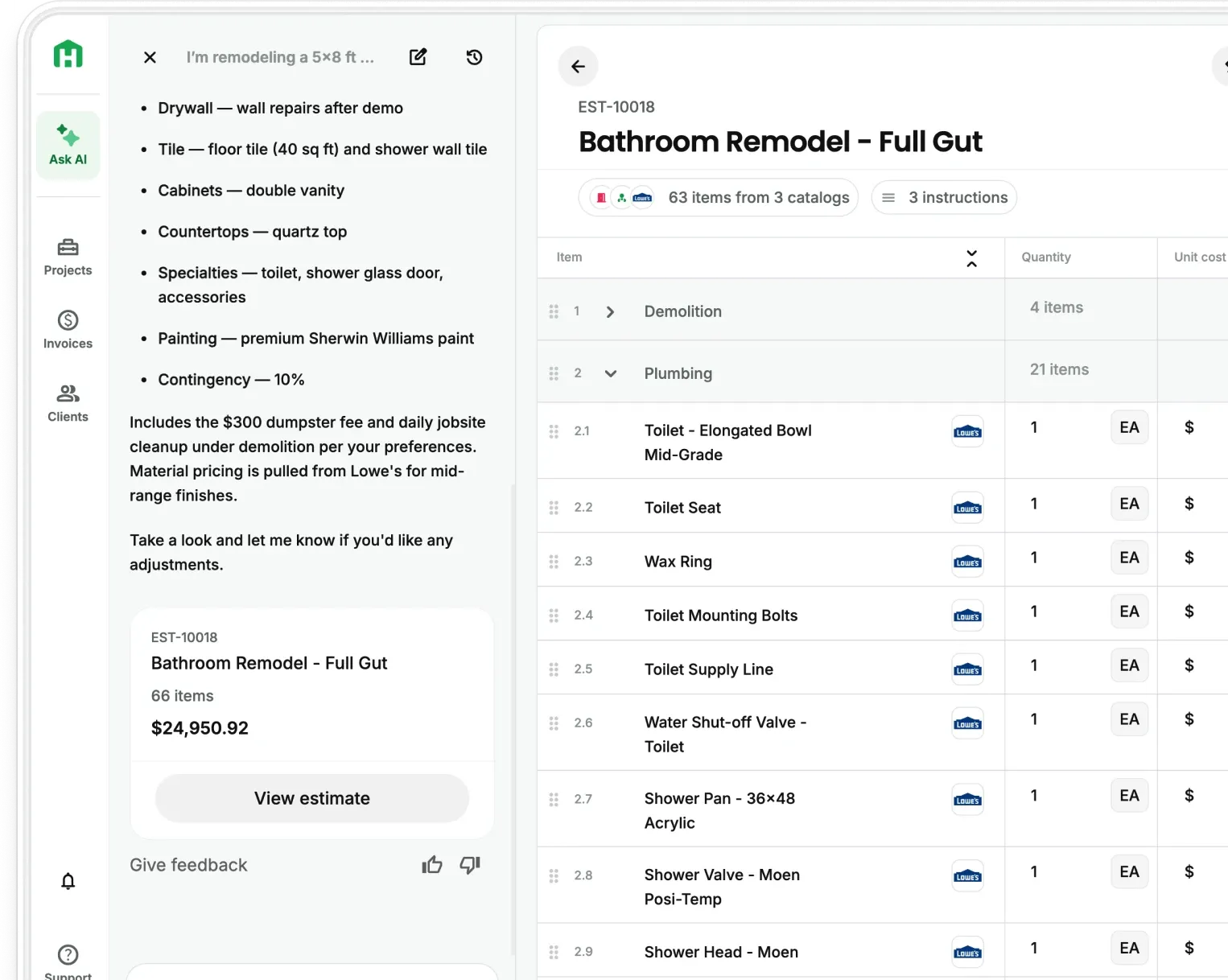
Here’s the short answer: When your takeoff, estimate, and budget live in the same app, the quantities the AI pulls from your plans become the estimate. The approved estimate then becomes your job budget. Then you track what you actually spend against it every day the job runs, without retyping a single number along the way. The longer answer covers the stretch between "the takeoff's done" and "the job came in on budget" which is where a lot of residential contractors slowly (and quietly) give back their margin.
What does an AI takeoff on Handoff give you?
A takeoff is the count of everything the job needs. An AI takeoff on Handoff built for residential construction reads your full plan set and pulls those counts for you, trade by trade.
- The quantities: Framing, roofing, siding, doors, windows, foundation, flooring, electrical, and the rest of the key trades, measured from the plans and grouped by scope.
- The proof: In Handoff, you get a color-coded PDF that shows exactly what was counted and how, with a legend by trade. You can share it with a client to show them where the number came from.
- The flags: A written summary calls out assumptions, missing information, and places where the plan sheets don't agree with each other. You know what to check before the estimate goes out.
All of that equals more than hours back, but days and maybe even weeks you can spend on other parts of the business (like preparing for the slow season coming up). A manual takeoff on a residential set can take 8 to 20 hours. On the flip side, AI Takeoffs in the Handoff app average 1-2 hours on residential plans up to 7,000 square feet.
If you want the background on how the AI reads plans, A Contractor's Guide to AI Takeoffs and 7 Things AI Takeoffs Can and Can't Read cover it. This blog is about what happens next.
Where do takeoff numbers usually get lost?
Most contractors lose them in the moves that come after the takeoff is done. Basically because you’re doing the work twice. You’re retyping them into an estimate (when they could’ve populated automatically). That means quantities get copied from one screen or printout into another. Every line you retype is a chance to grab the wrong row or drop a zero.
Other contractors rebuilt as a budget in a spreadsheet. Research from Raymond Panko at the University of Hawai'i found that people get individual spreadsheet formulas right about 95% to 98% of the time. Across a sheet with 100 formulas, that puts the odds of an error somewhere above 85%. And when one person reviews a spreadsheet for mistakes, they typically catch only 50% to 60% of them.
Another option is checking the takeoff against receipts at closeout. If actual costs only get compared to the budget after the job's done, an overage is a history lesson. You can't fix it anymore. You can only learn from it.
The problem here is the numbers have to travel too far and through too many hands before anyone checks them against the budget.
Turning a takeoff into a budget you can track
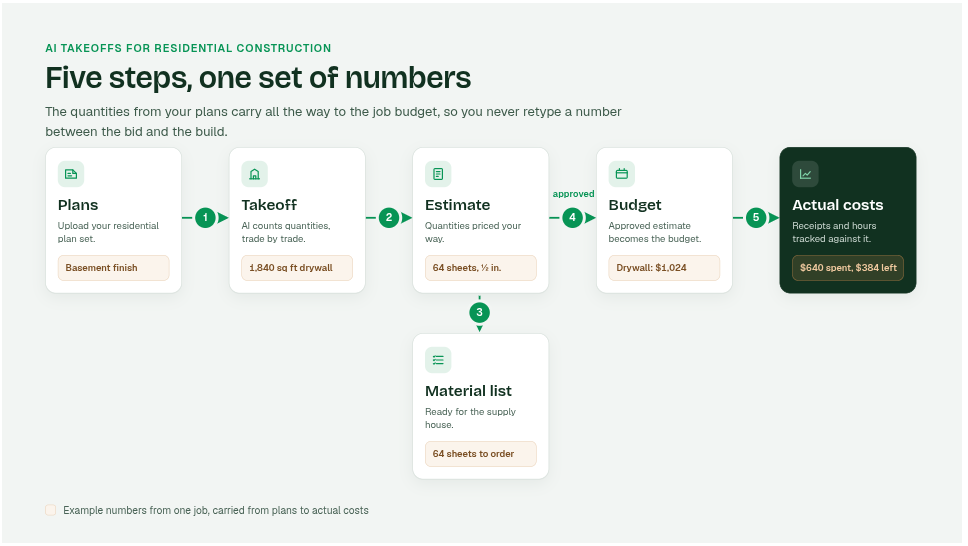
When everything stays in one system, the same set of numbers moves through four steps. You review it at each one, but you never rebuild it. Here’s how it works in the Handoff app:
- Takeoff to estimate: Your AI Teammate uses the scopes and quantities from the takeoff to build your estimate. You review it, adjust anything the flags pointed to, and apply your own pricing and markup.
- Estimate to material list: One click turns the estimate into a material list you can bring to your suppliers. Pricing is tied to your customized supplier catalogs like Home Depot and Lowe's, so the list reflects what the materials cost with localized pricing.
- Approved estimate to live budget: Once the client approves, AI Budget Tracking uses that estimate as the job's budget, broken out by section and by line item.
- Budget to actual costs: Upload a receipt, and your AI Teammate pulls out the vendor, date, amount, and line items, then suggests where each cost belongs in the budget. You approve it, edit it, or leave it unmatched. Time Tracking brings crew hours into the same budget, also on Pro and included on Scale.
Here’s the real value: A budget you can compare to real spending, while the job's still running, is what turns a good takeoff into a profitable job.
The median one-year rise in material costs for builders who started five or fewer homes is 9.1%, compared with 1.8% for builders with 100 or more starts, according to NAHB's July 2026 Housing Market Index survey.
NAHB points out that bigger companies can stock up ahead of price increases or lock in longer supplier contracts. A two- or three-person remodeling shop usually can't. So the price you bid and the price you pay at the counter can drift apart, and a live budget shows you that drift while there's still time to act on it.
The 4 things you should watch once the job starts
This is how a takeoff stops being a bidding tool and becomes the backbone of how you track the job. Check these four things as you go.
- Quantities against the takeoff: If you're reordering drywall the takeoff said you'd have enough of, find out why. It could be a field change, extra waste, or something the plans didn't show. Each answer tells you something different about the next bid.
- Change orders: Every change the homeowner signs should update the scope and the budget at the same time. AI Change Orders keep that new work tied to the project, so your budget reflects the job you're actually building.
- Labor hours: Materials are only half the job cost. Crew hours tracked by project show you whether the labor you estimated matches the labor you're spending.
- What happened on site: A quick daily note explains the numbers later. AI Daily Logs keep a running record, so an overage has a reason attached to it.
Ordering closer to what the job really uses pays off twice. You keep more money in the job, and you send less material to the dumpster. The EPA estimates that construction, renovation, and demolition generated 600 million tons of debris in the U.S. in 2018. Comparing what you ordered to what you used is how your next takeoff gets tighter.
If you're running several jobs at once, this same habit is what keeps them from blurring together. Our Ask an Estimator post on keeping track of multiple jobs goes deeper, and Handoff's contractor job tracking app puts every job's budget, schedule, and daily notes in one place.
A takeoff tells you what the job should take. The budget tells you what it's taking. You want both on the same screen.
Why does this matter more right now?
Homeowners are still spending, but the market isn't growing much. The Harvard Joint Center for Housing Studies projects that year-over-year growth in home improvement and repair spending will slow to just 0.5% by the second quarter of 2027.
In a flat market, homeowners collect more bids and push harder on price. That leaves less room in every job. The contractors who know their real job costs while the work is happening can bid tighter with confidence, because they're bidding from their own numbers instead of a guess. If you want to go deeper on pricing for margin, Profit vs Margin: How to Build an Estimate That Protects Your Margin walks through it.
See your next takeoff become a budget you can track
Try Handoff free for 7 days, no credit card required, and set up AI Budget Tracking on your next job. To see AI Takeoffs run on your own residential plans, talk to our team about Handoff Scale.
Other FAQs about AI takeoffs and job budgets
Do I still need to check an AI takeoff before it becomes my budget?
Yes. Treat it the way you'd treat a sharp junior estimator's first pass. Read the written summary, check anything it flagged as an assumption or as missing, and confirm field dimensions before you order. Once you've reviewed it, the numbers flow into the estimate and budget without being retyped.
Can I use an AI takeoff on a smaller remodel without a full plan set?
Handoff's AI Takeoffs are built for residential plan sets up to 7,000 square feet. For smaller remodels where you've only got a sketch, photos, or notes from a walkthrough, you can still upload those files and let the AI pull square footage, quantities, and material lists into an estimate. From there, it follows the same path to a budget.
Which Handoff plan do I need for the full takeoff-to-budget flow?
AI Takeoffs are on Handoff Scale. AI Budget Tracking and Time Tracking are on Handoff Pro, and Scale includes everything in Pro. So Scale gives you the whole path, from plans to a tracked budget, in one app.